Tune, flash, and diagnose your Subaru ECU
FastECU reads, writes, and tunes Subaru ECUs and TCUs over K-Line and CAN — calibration editing, bench unbricking, and live datalogging, grown from a mature Qt/C++ desktop app into FastECU NextGen, a new cross-platform rewrite.
Windows & Linux today, with macOS support arriving in FastECU NextGen.
Intended for off-road and closed-course competition use only.
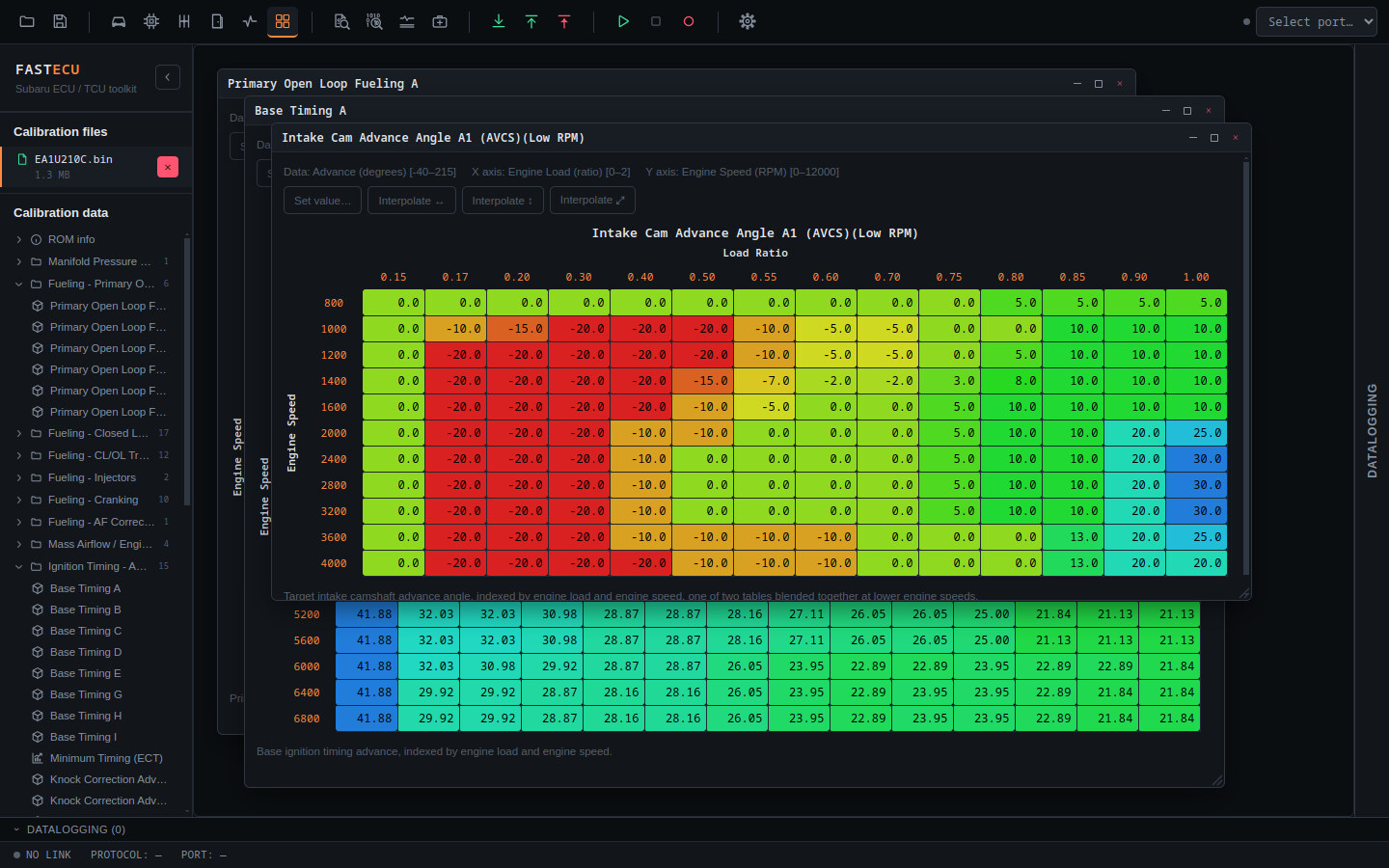
FastECU NextGen (in development) — the calibration editor with heatmap-colored tables from a ROM's own definition, several tables open at once.
Reverse engineering
Own your Subaru's calibration data, for life
Real reverse-engineered ROM definition and dump files for Unisia Jecs, Hitachi & Denso ECUs — buy a file once and it's yours permanently, including every future update as the reverse engineering work continues.
ROM definitions
- Named, sized calibration maps — fueling, ignition, boost control, and more
- Resolved addresses for that exact ROM ID, not a generic template
ROM dumps
- The matching factory dump for each definition, as a reference base image
Lifetime access
- One-time purchase, no subscription
- Every future revision of a file you own is included at no extra cost
Two builds, one project
Pick your FastECU
The original Qt/C++ app does the full job today. A ground-up Electron/TypeScript rewrite is catching up to it feature-by-feature, cross-platform from day one.
FastECU
The original, full-featured desktop app
Years of real-world Subaru tuning: live ECU read/write over K-Line and CAN, bench unbricking (BDM & bootmode), calibration editing, and live datalogging — for Windows and Linux. Free and open source under the GPLv3.
View source →FastECU NextGen
The next generation, in progress
A ground-up rewrite of the same tool: multi-ROM calibration editing, RomRaider/EcuFlash definitions, and live ECU communication being rebuilt protocol-by-protocol, now being tried on real cars.
See what's new →Qt vs NextGen
Feature comparison
What each build does today. NextGen is still catching up on the car side, so the table says how far each feature has been tried, not just whether it exists.
| Feature | FastECU (Qt) | FastECU NextGen |
|---|---|---|
| ECU & TCU communication | ||
| Read, test-write and write ROMs over K-Line and CAN | Yes | BuiltPorted for nearly every platform of the Qt app. Read, test-write and write have been run on a 16-bit Denso (HC16) ECU; the other platforms are not yet tried on a car. |
| Bench recovery (BDM and bootmode) | Yes | BuiltA Recovery page for the same ECUs. Not yet tried on a bench ECU. |
| Read and clear trouble codes | Yes | YesTried on a 16-bit Subaru ECU through the FastECU adapter and a Tactrix OpenPort 2.0; more platforms follow. |
| Live datalogging | Basic | YesGauge tiles, a time plot, one session per run with history, CSV recording, and saved sessions that can be loaded again. |
| CAN and K-Line bus monitor | — | BuiltSniff a bus, see ids change, decode SSM / UDS / KWP, and send messages by hand. |
| Remote control of an ECU session | YesWorks through a broker: connect to a remote FastECU with an address and a password. | BuiltSomeone else, with FastECU or the small FastECU Remote Client, works with the ECU on your adapter over the internet. Paired with a short code instead of an address, end-to-end encrypted through a relay. The relay run by FastECU is still being set up. |
| Calibration & tuning | ||
| 1D / 2D / 3D table editing with heatmap cells | Yes | YesFine and coarse steps, set-value expressions, interpolation. |
| Several ROMs open at once | Yes | YesEach ROM keeps its own open tables and tree state. |
| Copy and paste between maps | Yes | YesThrough the real clipboard, so it also works with a spreadsheet and between ROMs. |
| MAF scaling from a datalog | — | BuiltCorrects the MAF curve from fuel trims and the A/F sensor, shows it against the ROM's curve, and proposes it as an edit you review. Not yet tried with a real log. |
| Injector flow and latency from a datalog | — | BuiltFits the ROM's injector scaling and latency from a log, shows them against the ROM's values, and proposes the change as an edit you review. Not yet tried with a real log. |
| Virtual dyno | — | BuiltPower and torque curves from full-throttle pulls in a datalog of a manual car, with the car's weight and drag entered once. Not yet tried with a real log. |
| AI assistant access with reviewed edits | — | YesOptional. An assistant can read ROMs and logs and propose edits; nothing changes until you approve it. |
| Definitions & ROM tools | ||
| RomRaider and EcuFlash definitions | Yes | YesSeveral sources with a main one; problems in a definition are shown as warnings instead of hiding the table. |
| Hex editor | Yes | YesOutlines the bytes the definition's tables use, and can add a selection to the definition as a new table. |
| Definition downloads and updates from the server | — | PlannedDefinitions are added by hand for now. |
| Application | ||
| Updates inside the app | — | YesChecks at start-up and installs a new version with one click. Every update is signed, so a swapped file is not installed. Choose the Stable or the Beta track in Settings. |
| Platforms | ||
| Linux | Yes | YesA single AppImage that updates itself. |
| Windows | YesWindows 7 and later | YesWindows 7 and later: one installer for Windows 10 and later, and a separate 32-bit one for Windows 7 / 8 (without the assistant). The Windows 7 build installs, starts and updates itself on Windows 7; it has not yet been tried with an adapter on a car. |
| macOS | — | Planned |
| Adapters | YesOpenPort 2.0, FTDI / CH340 cables | YesOpenPort 2.0 (J2534), plain serial K-Line cables and the FastECU J2534 wireless adapter. |
Yes works and has been tried Built implemented and checked against protocol models, but not yet (or only partly) tried on real hardware Planned not there yet. Qt's column is the original app as it is used today.
FastECU (Qt)
What FastECU can do today
The full feature set of the mature, actively-used desktop app.
Live ECU communication
- Read, test-write, and write ROMs directly over K-Line or CAN
- Seed-key access methods per ECU/protocol
- Remote operation through a broker: use an adapter and ECU on another computer with an address and a password
- 18 ECU platforms and 7 TCU platforms supported — see full list below
Bench unbricking
- BDM recovery for Denso HC16 ECUs
- Bootmode kernel upload for early UJ/WA-series ECUs
- Custom kernels ported from the nisprog/npkernel projects
Calibration & tuning
- 1D/2D/3D map grid editing with heatmap-colored cells
- Fine/coarse +/- adjustment, "set value" expressions, interpolation
- Copy & paste between maps
Definition files
- RomRaider and EcuFlash XML definition formats
Live datalogging
- Basic SSM value logging with Play/Stop/Record
- Log to file for later review
Platforms
- Windows 7 32/64-bit and Linux, precompiled
- Open Port 2.0 and generic OBD-cable (FTDI, CH340) adapters tested
FastECU NextGen
What’s new in FastECU NextGen
Most of what the original does, NextGen does too, only reworked and better. These are the things the original does not have — see the feature comparison for the rest.
RomRaider, EcuFlash, and your own custom definitions are independently enabled with a configurable priority “main” source. Malformed or incomplete definitions show up as warnings in-app instead of silently vanishing.
A Definitions page that finds which tables exist for a ROM — identified automatically from its own ID bytes, or typed in — and shows how many were found and any parse warnings. The tables then appear in the sidebar tree, grouped by category, and the hex editor can add a selection of bytes to the definition as a new table.
Every selected parameter is drawn as a line graph over time (a rolling window you can zoom), next to the gauge tiles. Each run is kept as its own session that can be saved and loaded again, and recorded to CSV.
Connect to the FastECU J2534 adapter, including its wireless (WiFi) version, set its WiFi password and update its firmware, all from Settings.
A protocol’s transport, connect sequence, kernel and ROM layout, with its security-access and checksum definitions, can be described in a script and edited in Settings. If you want to add a protocol the app doesn’t have, you can write a script for it — a new protocol variant can be a script, not new code.
An optional local MCP server, off until you switch it on, lets an AI assistant read the open ROM, its tables and your datalogs and propose edits. You review every proposed cell before and after, and apply, reject or undo it — the assistant never changes a ROM itself. (Not in the Windows 7 build.)
FastECU checks for a new version when it starts and installs it with one click. Every update is signed with FastECU’s release key, so a swapped file is never installed. Switch to the Beta track in Settings to get test builds before they are released to everyone. Help → About shows the version, platform and build details to copy into a support message.
Windows 10 and later, Windows 7 / 8 (a separate 32-bit build) and a Linux AppImage, each updating itself. The theme is dark, light or follows the system.
Corrects the MAF Sensor Scaling curve from fuel trims (closed loop) and the A/F sensor against the target AFR (open loop), shows it against the curve in the ROM, and proposes it as an edit you review. Built, not yet tried with a real log.
Sniffs a CAN or K-Line bus through the adapter, decodes SSM, UDS and KWP messages, lights up the bytes that change per id, and sends messages by hand. Built, not yet tried on a car.
The original also works through a broker; NextGen adds pairing with a short code, so there is no address to type, and a relay run by FastECU. Someone else — with FastECU or the small FastECU Remote Client — works with the ECU connected to your adapter over the internet, end-to-end encrypted through a relay that only forwards bytes. Built; the relay run by FastECU is still being set up.
Fits the Injector Flow Scaling and Injector Latency of the loaded ROM from a datalog, shows them against the ROM’s values and proposes the change as an edit you review. The tab can start a log of just the values it needs. Built, not yet tried with a real log.
Power and torque curves from full-throttle pulls in a datalog of a manual car, from the car’s weight, drag and rolling resistance entered once and saved per car. Built, not yet tried with a real log.
FastECU (Qt)
Supported ECUs & TCUs
Flashing over OBD is supported today for the following platforms.
ECU — flashing over OBD
- Forester, Impreza, Legacy Turbo 1999–2000 K-Line (UJ WA12212920/128KB)
- Forester/Impreza/Legacy 16bit Denso 2001–2005 K-Line (Denso HC16/160KB)
- Forester JDM Cross Sports (Denso SH7055/512KB)
- Legacy JDM GT MY03+ (Denso SH7055/512KB)
- Legacy JDM GT MY05+ (Denso SH7058/1MB)
- Impreza WRX/STi MY06–07 (Denso SH7058/1MB)
- Impreza WRX/STi MY08+ (Denso SH7058S/1MB)
- Impreza, Legacy Diesel MY07+ EURO4 (Denso SH7058S/1MB)
- Impreza, Legacy Diesel MY11+ EURO5 CAN (Denso SH7059/1536KB)
- Impreza, Legacy Diesel MY17+ EURO6 CAN (Denso SH72543/2MB)
- Forester, Impreza, Legacy 2000–2002 K-Line (UJ WA12212930/256KB)
- Forester, Impreza, Legacy 2002–2005 K-Line (UJ/Hitachi WA12212940/384KB)
- Forester, Impreza, Legacy 2002–2005 K-Line (UJ/Hitachi WA12212970/512KB)
- Forester 2006, Impreza 2006–2007 K-Line (Hitachi WA12212970WWW/512KB)
- Forester 2007–2008, Impreza 2008+, Legacy 2006+ CAN (Hitachi WA12212970WWW/512KB)
- Forester 2009–2011/Legacy 2010–2011 CAN (Hitachi SH7058/1MB)
- Forester, Impreza, Legacy, BRZ 2013+ CAN-bus (Denso SH72531/1.25MB)
- Forester 2013+ CAN (Hitachi SH72543/2MB)
TCU — flashing over OBD
- CAN (Denso SH7055/512KB)
- CAN (Denso SH7058/1MB)
- CVT CAN (Hitachi M32176F4/512KB)
- K-Line (Hitachi M32176F4/512KB)
- CAN (Hitachi M32176F4/512KB)
- CVT CAN (Mitsubishi MH8104/512KB)
- CVT CAN (Mitsubishi MH8111/1.5MB)
Bench flash (unbrick)
- BDM: Forester/Impreza/Legacy 16bit Denso 2001–2005 (HC16/160KB) — ROM implemented, TPU in progress
- Bootmode: Forester, Impreza, Legacy Turbo MY99–00 (UJ WA12212920/128KB)
- Bootmode: Forester, Impreza, Legacy 2000–2002 K-Line (UJ WA12212920/128KB)
- Bootmode: Forester, Impreza, Legacy 2000–2002 K-Line (UJ WA12212930/256KB)
In development / planned
- Forester 2013+ CAN (Hitachi SH7059/1.5MB) — planned
- Bootmode: 2002–2005 K-Line (UJ/Hitachi WA12212940/384KB, WA12212970/512KB) — in development
In FastECU NextGen, every one of these protocol definitions is already wired into the vehicle picker — live read/write support is built and is being tried on real cars platform by platform.
Get FastECU
Two products, two ways to get them.
FastECU
Free & open source (GPLv3)
Precompiled Windows & Linux builds are coming to this page soon. In the meantime, build it yourself from source.
View source on GitHubFastECU NextGen
Subscription access, opening soon
Details on pricing and availability are coming to this page soon.
Coming soon