Account, plans & license key
Connecting FastECU to an ECU needs a subscription in good standing. Everything that works on files on your computer does not.
What needs a license
- Needs a license: connecting to an ECU or TCU (reading, writing, trouble codes, live data) and the AI assistant.
- Does not: opening ROMs, definitions, editing tables, the hex editor, comparing ROMs, viewing saved datalogs.
1. Create an account
- Register on this site with your email address and verify the address from the email you receive.
- A new account starts with a trial, so you can try ECU access before choosing a plan. Your account page shows its status.
Subscription plans and pricing: coming soon
This is not ready yet. Check back later, or ask on the forum.
2. Get your license key
Your key is generated on the license key page when you are logged in. Copy it.
3. Activate it in the app
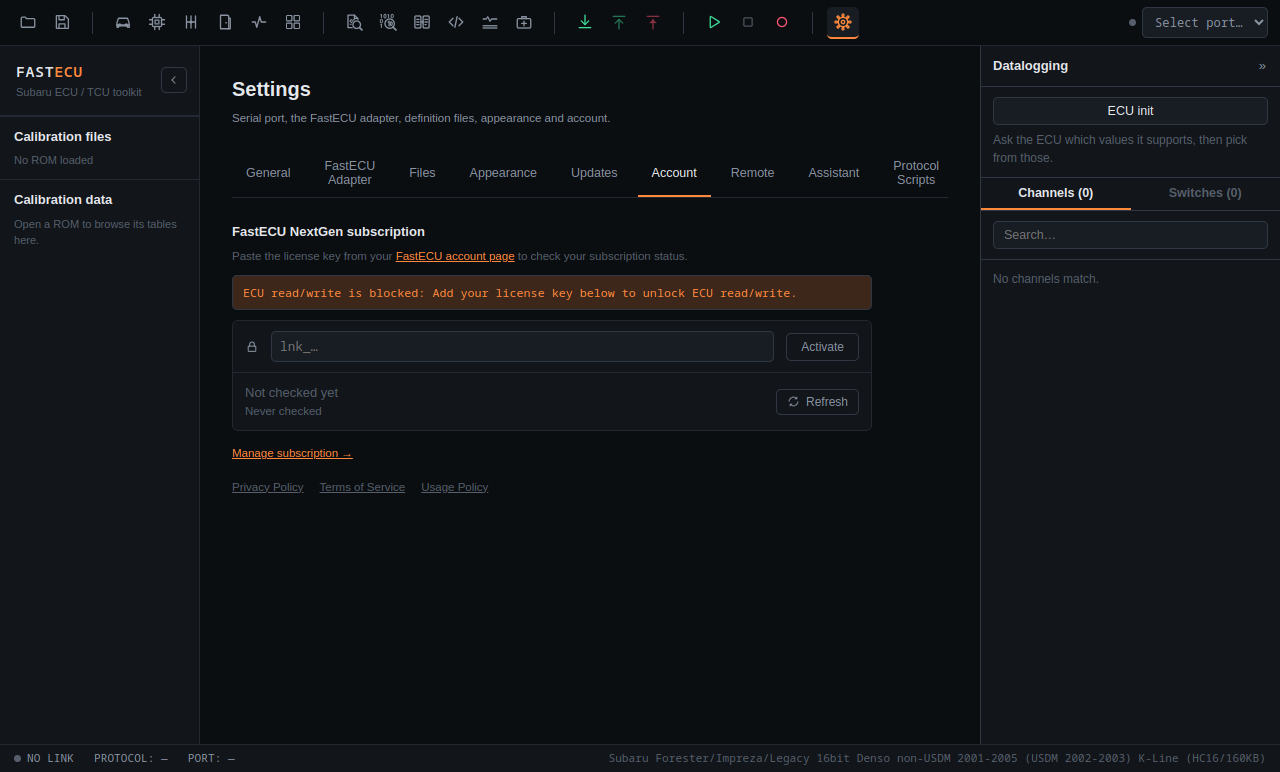
- Open Settings › Account.
- Paste the key and press Activate.
- The tab shows your plan, whether the key is valid and when it was last checked.
The Refresh button re-checks the key at any time, for example right after you changed your plan. Manage subscription opens your account page in the browser.
How the check works
- FastECU checks the key on launch and then every 6 hours. Only the key is sent, nothing about your computer or how you use the app.
- The check runs before connecting to the ECU, so a blocked account fails immediately instead of halfway through a connection.
- An invalid key, an expired trial or a subscription whose payment is past due blocks ECU access right away. The Account tab says which it is.
- Offline is tolerated. If FastECU cannot reach the website (no internet, site down), you can keep working for up to 7 days after the last successful check, so a flash in a garage without a connection is not cut off.
Is the key blocked and you do not know why?
Open Settings › Account and press Refresh. The tab explains the reason in plain words. If it still looks wrong, write to info@fastecu.fi from the address of your account.
The legal side: Terms of Service, Usage Policy and Privacy Policy.