Map calculator
Combine two tables, or a table and a number, cell by cell into a third table, for example Base Timing + Knock Correction Advance Max, the most timing the ECU can run.
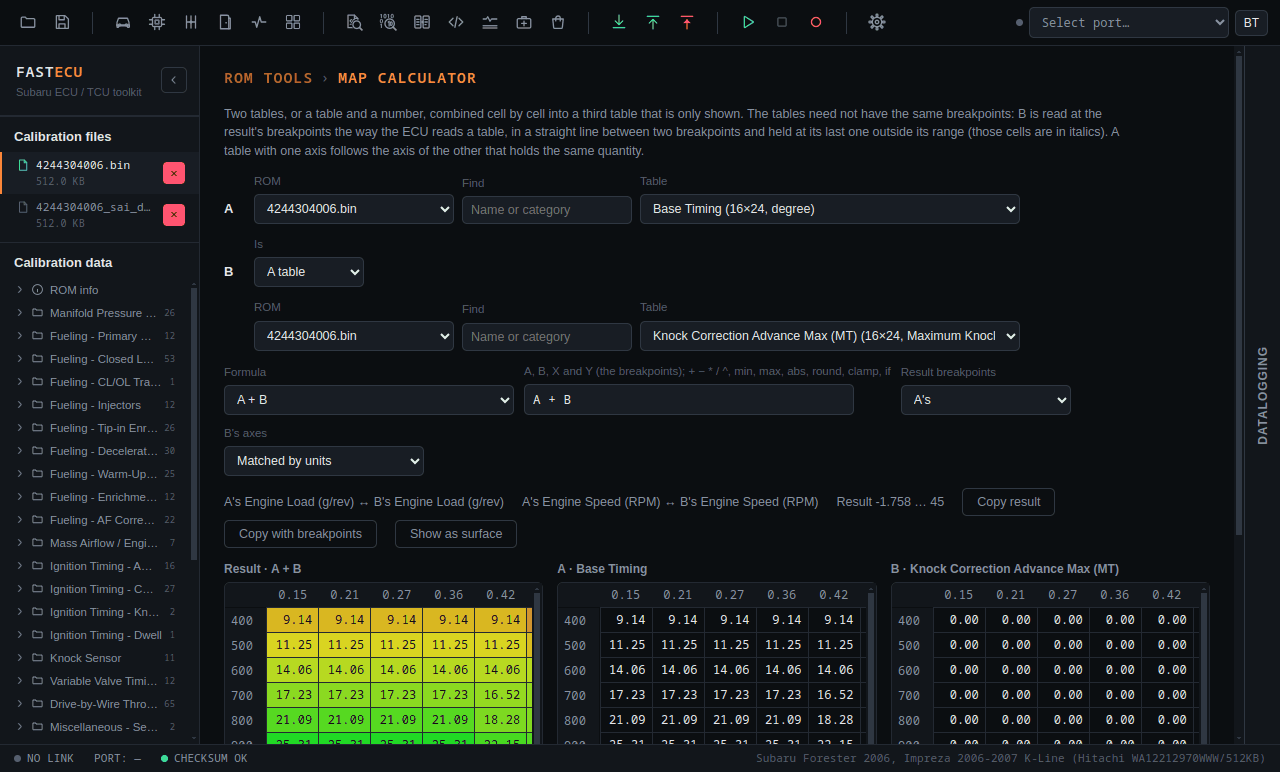
Open Tools › Map Calculator (or its toolbar button, if you have turned it on in Settings). The tables can come from one open ROM or from two. The result is only shown; it does not change a ROM.
Using it
- Choose table A (any open ROM, with a search box), and for B either A table or A number.
- Pick a Formula (A + B, A − B, B − A, A × B, A ÷ B, A corrected by B %, change from A to B in %, larger or smaller of the two) or write your own. A formula can use A, B and the breakpoints X and Y, with
+ − * / ^,min,max,abs,round,clampandif. - Choose the Result breakpoints: A's, B's or both merged.
- The tables need not have the same breakpoints. B is read at the result's breakpoints the way the ECU reads a table: in a straight line between two breakpoints, and held at its last value outside its range. Those held cells are in italics.
- Axes are paired by their units (engine load with engine load, engine speed with engine speed), so a table whose axes are the other way round still lines up. A table with one axis follows the axis of the other that holds the same quantity. Both can be set by hand.
- Copy result copies the result's cells to paste into a table: select the first cell of the table and press Ctrl+V. Copy with breakpoints adds the breakpoints (X on top, Y on the left) for a spreadsheet; that one is not for pasting into a table.
- Show as surface draws a result with two axes in 3D.
- The calculator remembers its tables, formula and options while the app runs, so you can look at another page and come back to the same result.